Current version
A single approved version that stays valid while you prepare the next one, with history and comparison between versions.
Policy library
Start from 67 templates in five languages, write them on the page with your document's design and manage their full lifecycle: review, approval, signature, versions, team reading and export to Word. Every approved policy can serve as evidence in your audits.
Why it matters
ISO 27001, NIS2, ENS, GDPR and DORA require documented policies. Writing them is rarely the problem: the hard part is keeping them up to date, knowing which version is current and proving who approved it and when.
A single approved version that stays valid while you prepare the next one, with history and comparison between versions.
Who reviewed, who approved and who signed, with the date and a fingerprint of the exact version.
A next-review date and an owner, so no policy goes out of date unnoticed.
How Audexa helps
Drafting, governance and evidence in one place, connected to the frameworks you audit.
Start from a solid foundation.
Security, privacy, operations, compliance and HR, linked to each framework.
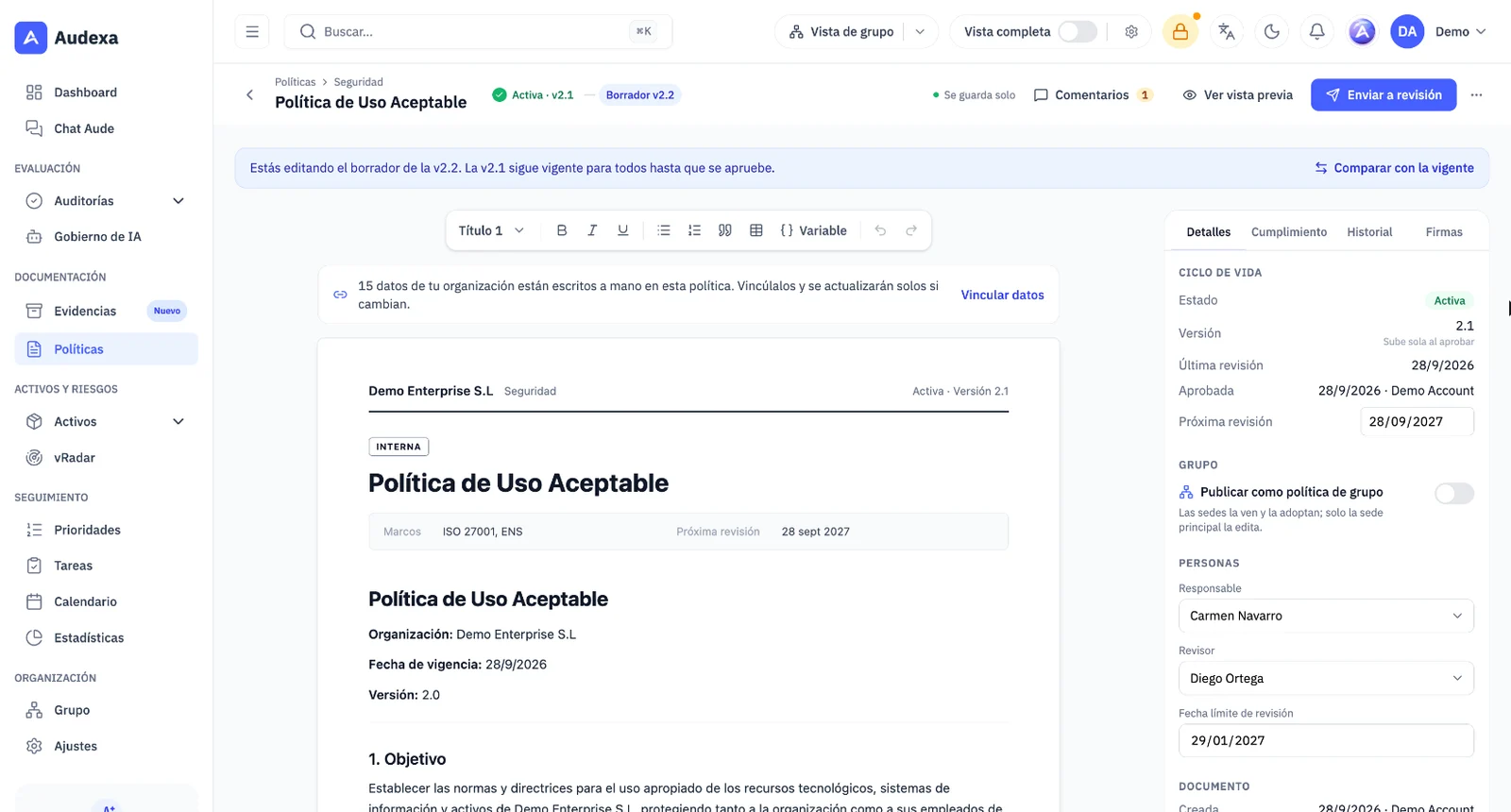
You write with your document's design in view, with a section outline and a panel with Details, Compliance, History and Signatures. Drafts save themselves.
Organization, owner, version or next review update themselves in drafts and are fixed on approval. In older policies, “Link data” turns hand-typed text into variables.
Select a paragraph and Aude suggests improving it, making it clearer, adapting it to one of the policy's frameworks or translating it. The document only changes if you click Replace.
Fonts, headers, colors, logo, classification levels and section numbering.
Control of the full lifecycle.
Editing an active policy creates the draft of the next version. You send it for review with the reason for the change, the reviewer approves or requests changes, and you can compare two versions.
Comment on a paragraph and reply to or resolve the conversation next to the document. The outline marks sections with open comments.
Drawn signature or an email request with a single-use link valid for 14 days.
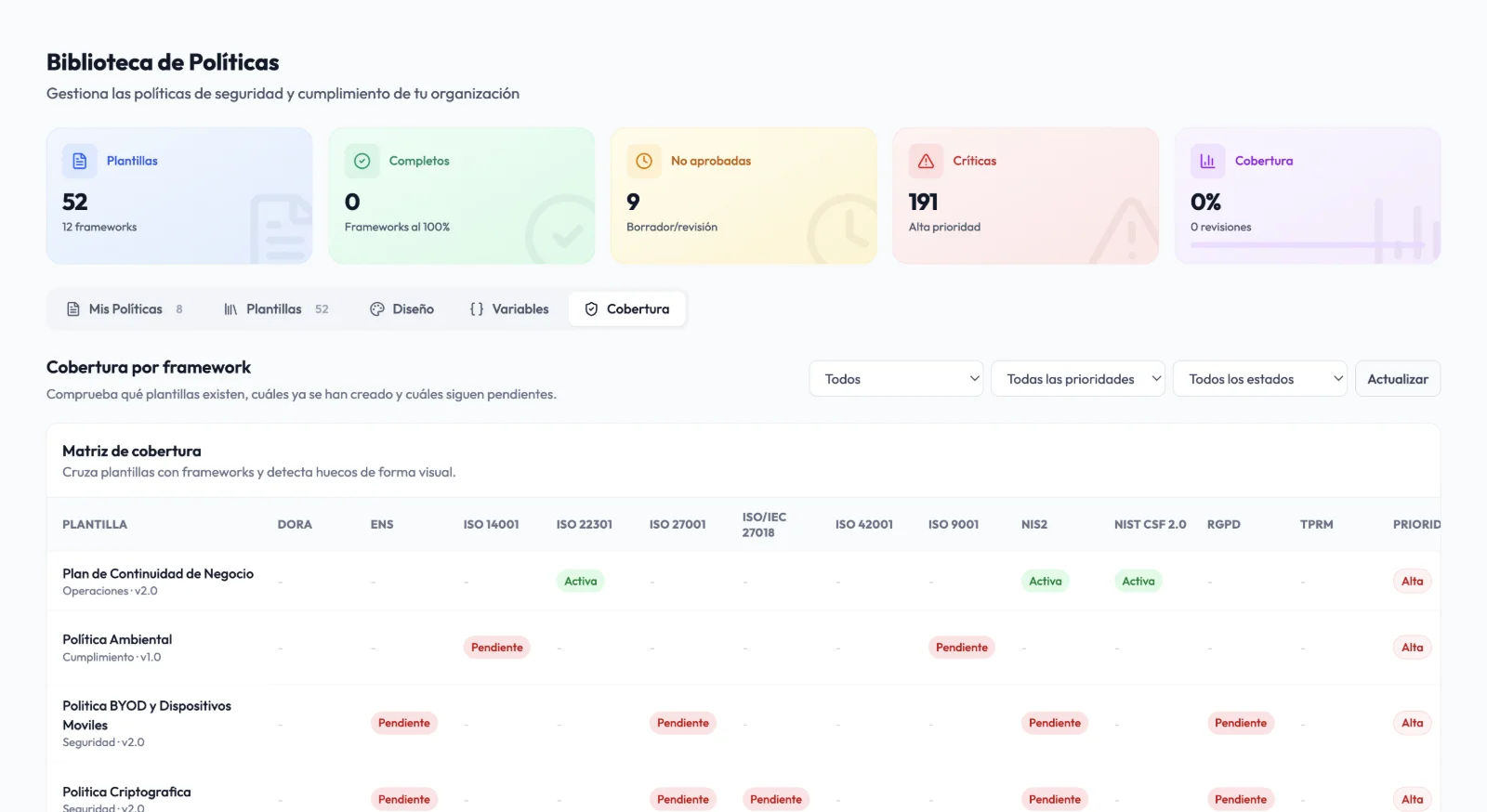
Which common policies each standard covers, which you have and which are missing, by priority and status.
Policies as proof of compliance.
Save an immutable copy of the active version in the evidence vault; when a new version is approved, the copy is updated.
Ask the team to read and accept the policy: each person confirms the version they have read, and the Word file and the evidence include it.
Download in Word or PDF with your organization's design.
SHA-256 fingerprint of the signed version: if the policy changes, a new signature is required.
Some features depend on your plan and active modules.
Templates
The templates cover the areas that come up most often in audits and are linked to the frameworks you manage: 43 to ISO 27001, 39 to ENS, 35 to NIS2, 20 to GDPR and 4 specific to DORA.
Compliance by control
In the Compliance panel, Aude reads the policy and tells you which controls from its frameworks each section covers, which it covers partly and which are missing. For what is missing, it suggests clauses you can insert if you want: the decision is always yours.
Team reading
Ask the whole team to read and accept an active policy. Each person confirms the version they have read, anyone who still has it pending gets a reminder in the bell on Mondays and, when a new version is approved, the same people are asked again.
Signing
Send a signature request to a team member or any email address. The link is single-use, expires in 14 days and is tied to the exact version of the document.
How it works
Filter by framework and priority and start with the policies you're missing.
Write on the page with live variables and help from Aude, gather comments and send it for review with the reason for the change.
Collect signatures and team readings, export to Word and save it as evidence for the control.
Before and after
Starting point
A blank page or generic templates
67 templates linked to each standard
Current version
“policy_final_v3_FINAL.docx”
One approved version, with a draft of the next one and comparison
Communication
An email with the PDF attached
Acknowledgement confirmed per person and version
Signatures
Emails and scanned PDFs
Link-based signing with a version fingerprint
Review
Forgotten until the audit
Review date and owner
Evidence
Attaching the Word file by hand
Immutable copy in the evidence vault
Frequently asked questions
It stays valid. Editing an active policy creates the draft of the next version; the current one is only replaced when the reviewer approves the new one. If the reviewer requests changes, the draft comes back to you with their comments.
Not on its own. Aude suggests wording, clauses or translations, and the document only changes if you click Replace or insert the clause. Approval always comes from a person.
They're a solid starting point, but every policy must be adapted to your organization's reality. Variables and the editor make that quick, and the review workflow ensures someone validates the policy before it's approved.
Word (.docx) and PDF, with your organization's design and branding.
It's an internal approval signature with traceability (who, when and which version), designed to demonstrate policy governance to auditors. It does not replace a qualified electronic signature.
All 67 templates are available in Spanish, English, French, Italian and German.
The policy library is included in the Premium and Diamond plans and can also be purchased as a separate module.
Yes, with Sites and group, which Audexa activates on request on Premium (3 sites) and Diamond (5), extendable. The main site publishes group policies that are mandatory or adaptable: each site adopts or adapts them and signs its own, and when a new version comes out, the adapted copies are flagged for review.
Request a demo
In 30 minutes we create a policy from a template, take it through review and signature and turn it into evidence.